
DeckMania for Blender
Save time. Create more.
System requirements:
- Windows OS, MacOS
- Stream Deck 7.0 and newer
- Blender 4.3 and newer

Lattest news
What is Deckmania for Blender?
DeckMania for Blender is your shortcut to a smoother, faster, more intuitive creative flow. Whether you’re modeling, animating, or rendering, this tool bridges Blender and Elgato Stream Deck in a way that feels like magic.
What Can You Do With DeckMania?
- One-click script execution — Launch custom Blender Python scripts without digging through menus.
- Favorite tools at your fingertips — Instantly access and identify active tools with smart color-coded buttons.
- Dial into precision — Use Stream Deck Plus dials to control values in Blender like a pro.
- Automatic page switching — DeckMania knows what mode you’re in and switches your Stream Deck layout automagically. It’s like having an assistant who never takes coffee breaks.
Why You’ll Love It
Customize Everything – Pre-made profiles or your own perfect setup? Yes and yes. DeckMania for Blender is a Licensing-Enabled Plugin for connecting Stream Deck devices to Blender. With this app, you can:
Save Time – Less clicking, more creating.
Stay Focused – Everything you need is right there on your deck.
- Install or update the DeckMania for Blender Software in the Stream Deck app
- Link Blender to the plugin
- Install a custom profiles for your device to enable automatic page switching
- (Optional) Install the Icons Pack to customize button appearance
- (Optional) Access custom buttons and extras
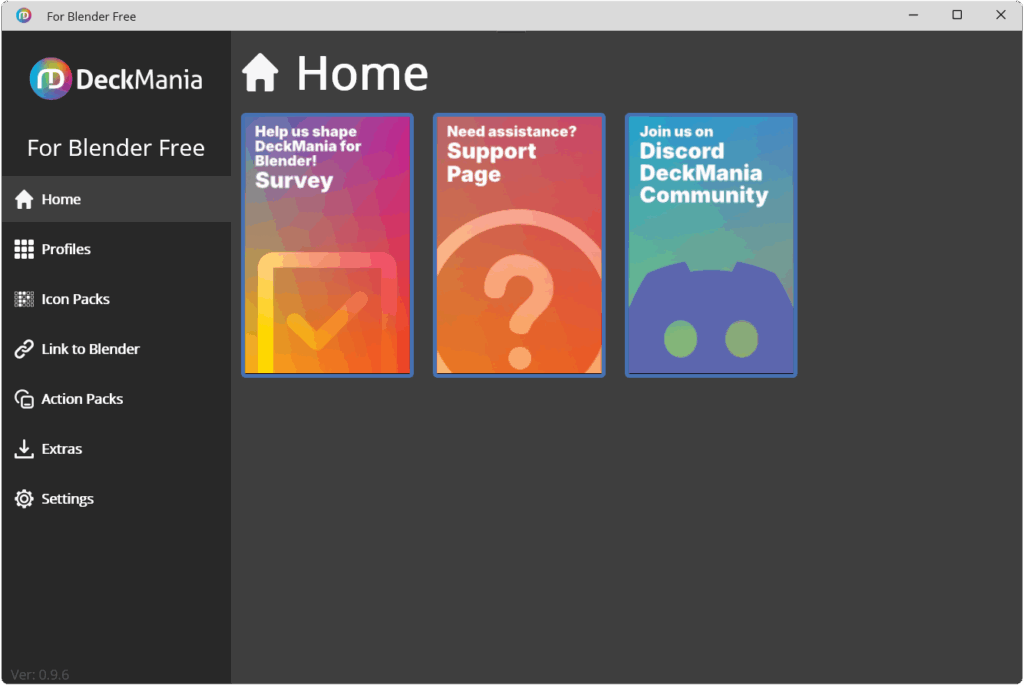
The DeckMania Lite Membership is available at no cost, giving you unlimited time to try it out.
To use the DeckMania for Blender application, you need a user account. You can start with a LITE Membership to explore the basic features and see how DeckMania fits into your workflow. The LITE membership is available at no cost, giving you unlimited time to try it out.
What does the Deckmania for Blender software do?
The plugin adds 6 types of buttons to your Stream Deck: Script, Tool, Dial, Switchᴾᴿᴼ, Dialogᴾᴿᴼ, Pie Menuᴾᴿᴼ. It automatically switches the profile page on your Stream Deck based on your current object mode or workspace in Blender.
About Stream Deck devices
For those who aren’t familiar with the Stream Deck, the Stream Decks are a range of hardware devices, each with buttons that are actually LCD screens, so you can customize them however you want.
Not ready to invest in hardware? No problem! A mobile version of Stream Deck is available from Elgato at no cost. Having 6 customizable buttons at your fingertips — for scripts, switches, custom dialogs, custom pie menus — can be surprisingly powerful.
Features
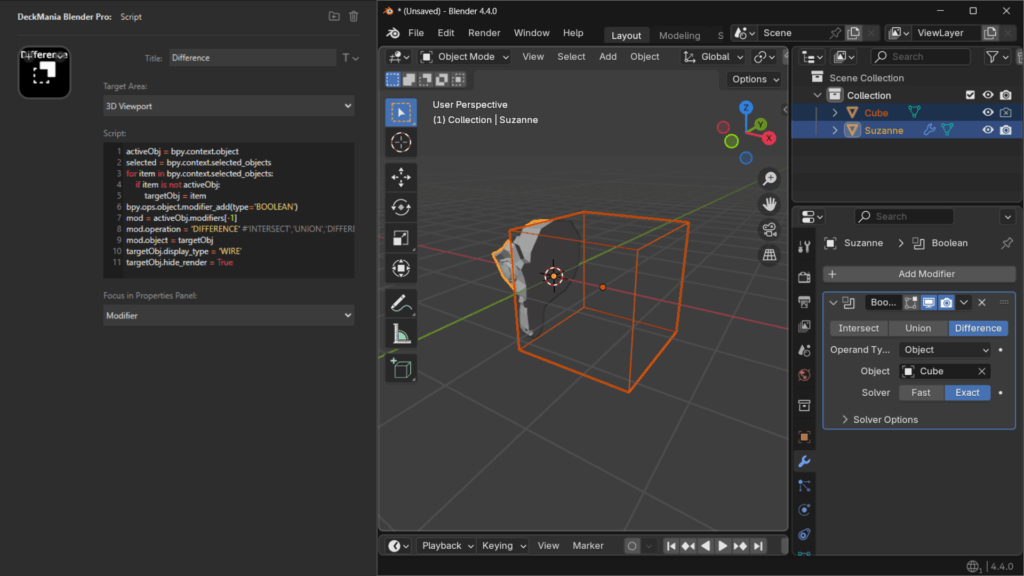
SCRIPT
Run your Blender Python (BPY) scripts with just one click.
You can write your own scripts in the built-in code editor, choose where they run (context), and even set the focus—like jumping straight to the Modifiers tab when your script tweaks modifiers.
It’s quick, flexible, and way more fun than digging through menus.
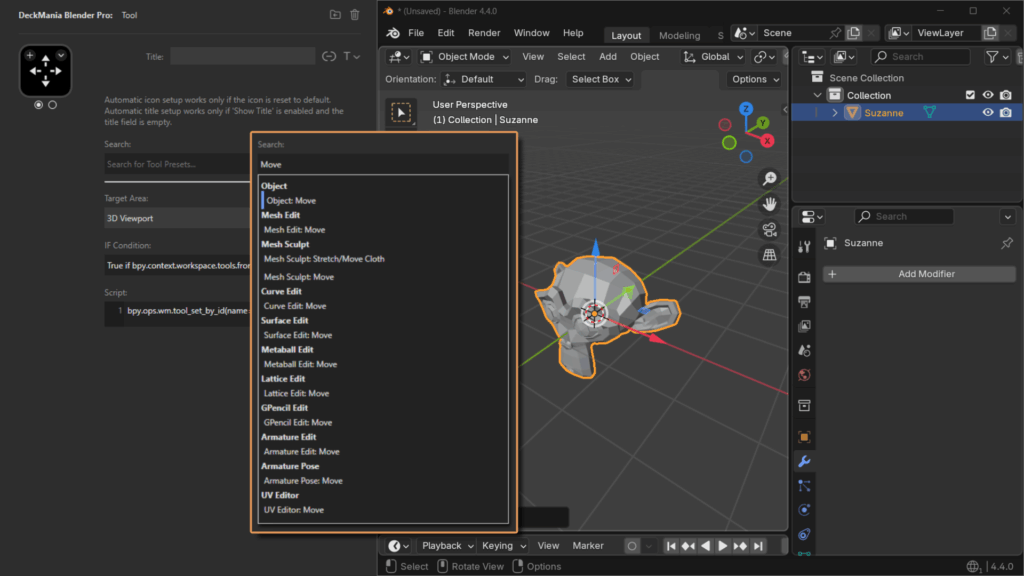
TOOL
Add your favorite tools and instantly see which one is active — the button changes color.
Setup is super simple: just search by keyword, pick a tool from the list, and everything’s auto-filled — icon, necessary code, the works.
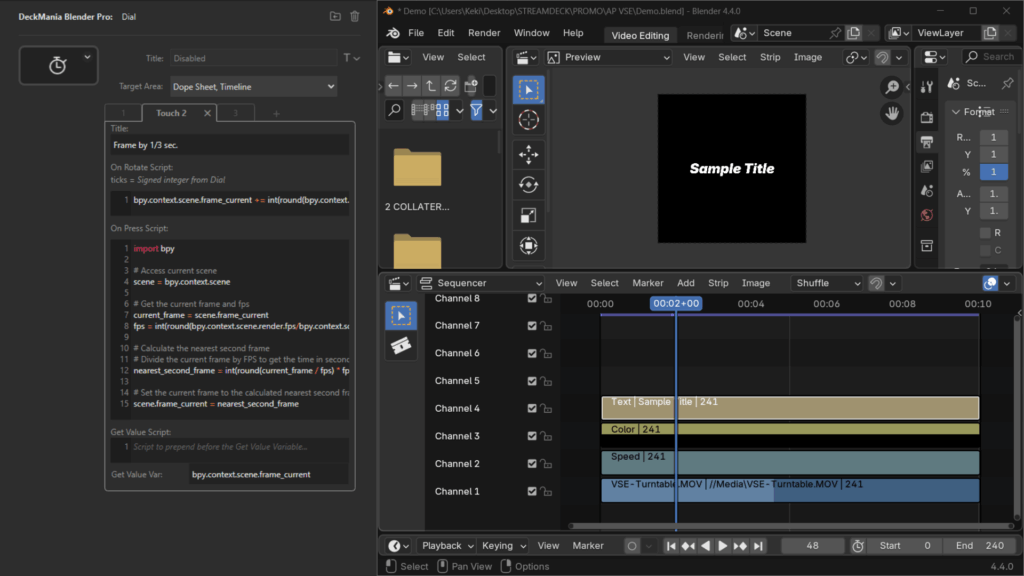
DIAL
Adjust values using dials (available on Stream Deck Plus).
Tap the touchbar to switch modes on a single dial, and display any property value right on the touchbar.
Use the built-in code editor to customize what happens when you rotate or press the dial — it’s quick to set up and super flexible.
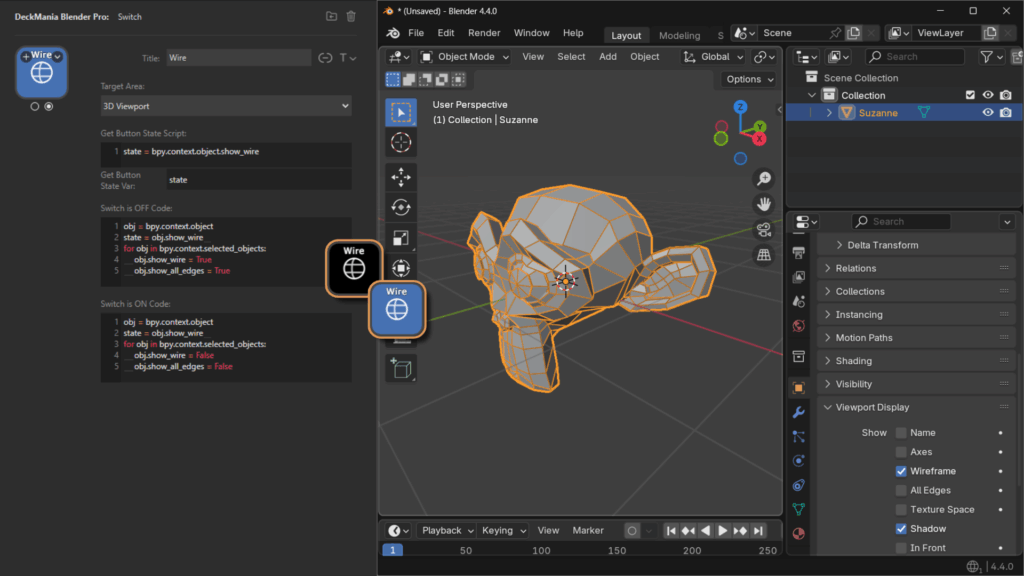
SWITCH [Pro]
Click to toggle settings on or off. The button updates visually when active.
It stays in sync with your Blender property, so you always know what’s active.
Just add the code for the ON and OFF states — easy and powerful.
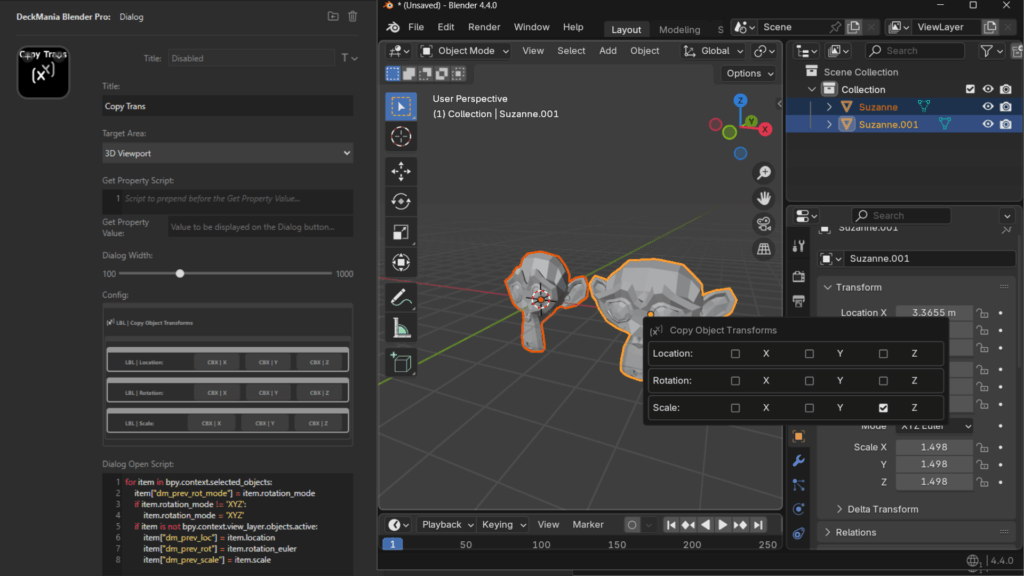
DIALOG [Pro]
Create custom dialogs. Show property values directly on the button.
Design your own pop-ups in Blender — with buttons, radio buttons, checkboxes, even native properties.
It’s easy to set up and a great way to organize your Blender options and commands for one-click access.
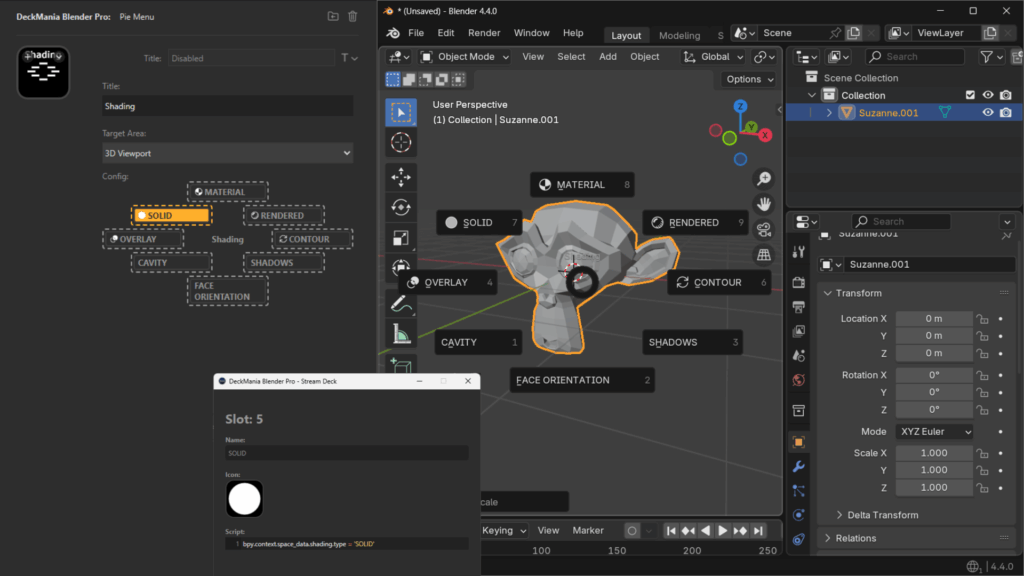
PIE MENU [Pro]
Build your own pie menus.
Trigger actions easily with a quick mouse swipe. Super easy to set up: drop in your commands across 8 available slots and go.
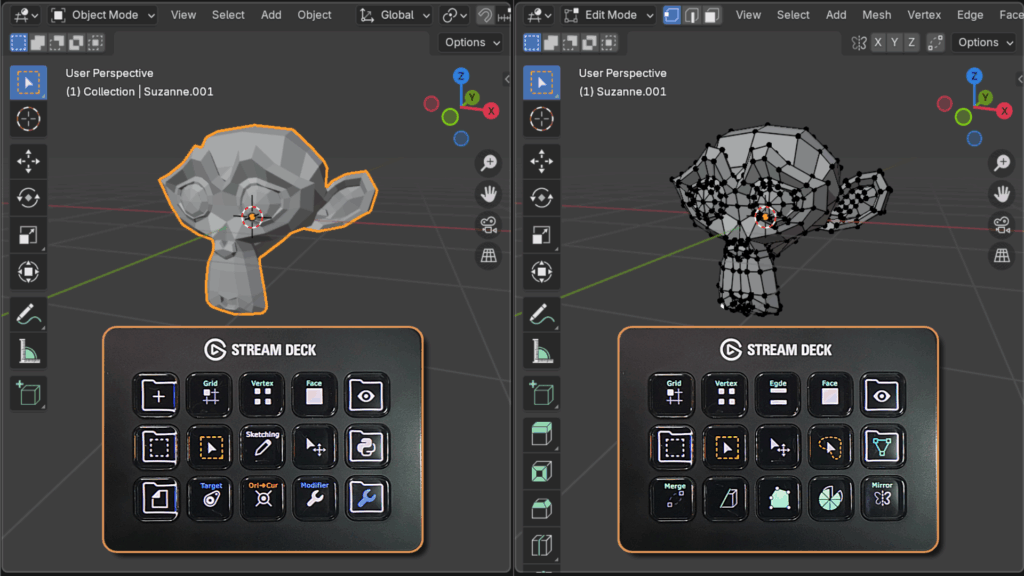
AUTOMATIC PAGE SWITCHING
It automatically switches the profile page on your Stream Deck based on your current object mode or workspace in Blender.
It comes with predefined profiles, but if the predefined profiles don’t quite fit your style, it’s super easy to customize them to match your needs.
Get started today!
If you need additional actions or more flexibility in managing your profile, the DeckMania Pro is the ideal choice.
| LITE Membership | PRO Membership | |
| Script Action | ✅ | ✅ |
| Tool Action | ✅ | ✅ |
| Dial Action | ✅ | ✅ |
| Switch Action ᴾᴿᴼ | ❌ | ✅ |
| Dialog Action ᴾᴿᴼ | ❌ | ✅ |
| Pie Menu Action ᴾᴿᴼ | ❌ | ✅ |
| Automatic Page Switching | ✅ | ✅ |
| Stream Deck Profile Pages | 3 | Unlimited |
| Support & Updates | ✅ | ✅ |