Profile Switching
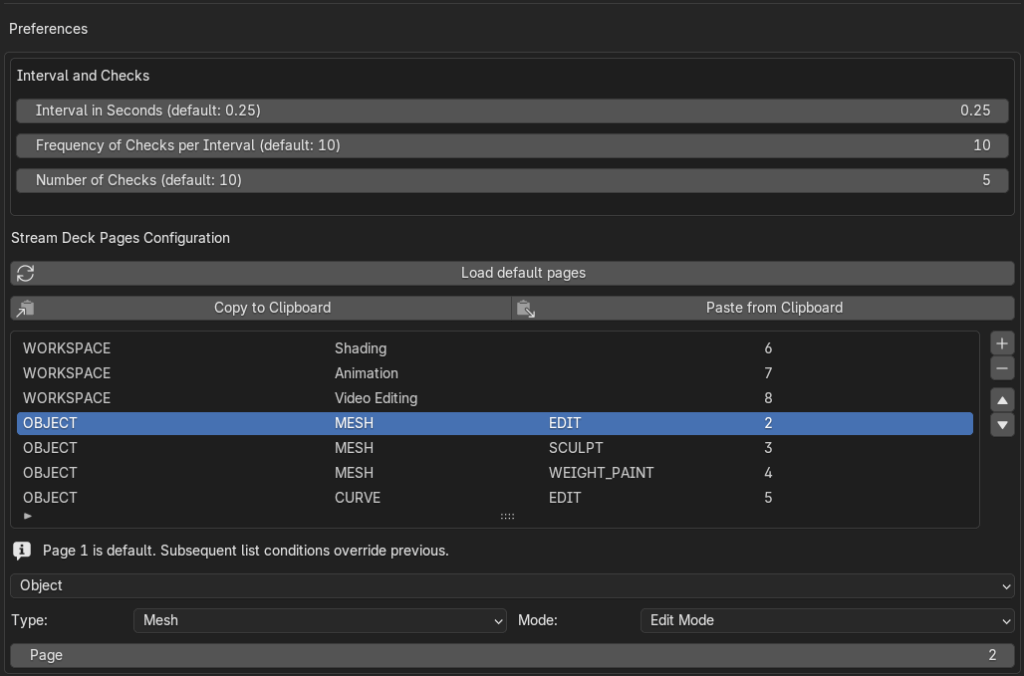
Both the LITE and PRO versions feature automatic profile switching. This function changes the Stream Deck pages based on your activity in Blender, specifically the Object Type, Object Mode, or Workspace Name.
Blender is automatically assigned as the default app for the DeckMania profile in the Stream Deck app, so no manual assignment is necessary.
Limitation
You must use a dedicated DeckMania profile to enable automatic switching, and you are limited to only one profile per Stream Deck device.
LITE vs. PRO Profile
The primary difference lies in the number of pages available for automatic switching:
- LITE Version: Limited to a maximum of 3 pages.
- PRO Version: Includes unlimited pages, with 8 pages configured by default.
The pre-configured pages demonstrate the capability of each version:
| PAGE | LITE (Limited to a maximum of 3 pages) | PRO |
| 1 | Default | Default |
| 2 | Mesh Edit | Mesh Edit |
| 3 | Mesh Sculpt | Mesh Sculpt |
| 4 | Mesh Weight Paint | |
| 5 | Curve Edit | |
| 6 | Workspace: Shading | |
| 7 | Workspace: Animation | |
| 8 | Workspace: Video Editing |
Customization
All of these automatic configurations can be viewed and customized within the DeckMania for Blender add-on settings in your Blender Preferences.